
PRISM Surface · Development Insights
Breaking Texture Repetition in Unity 6 HDRP
Why textures repeat, how triplanar and stochastic sampling help, and what PRISM Surface's controlled Unity HDRP comparisons reveal about their trade-offs.
The problem: a surface becomes a pattern
A stone cluster looks convincing once. Repeat it across a large wall or floor and it becomes a landmark: the eye starts following a grid instead of reading a continuous surface. A higher-resolution texture can sharpen that landmark without making it less repetitive.
The comparison below uses the same forest-ground maps on the same flat, chamfered panel. In A, repeated groups of stones reveal the grid. In B, stochastic sampling disrupts their arrangement. Look closely: softened stones and broad blended patches remain visible.
| Control | A: regular | B: stochastic |
|---|---|---|
| Anti-Tile Mode | None (0) | Stochastic Tiling (2) |
The shared shader values are saved identically in both materials. A bypasses the anti-tile controls; B uses them. See Reproduce this comparison for the recorded values and capture setup.
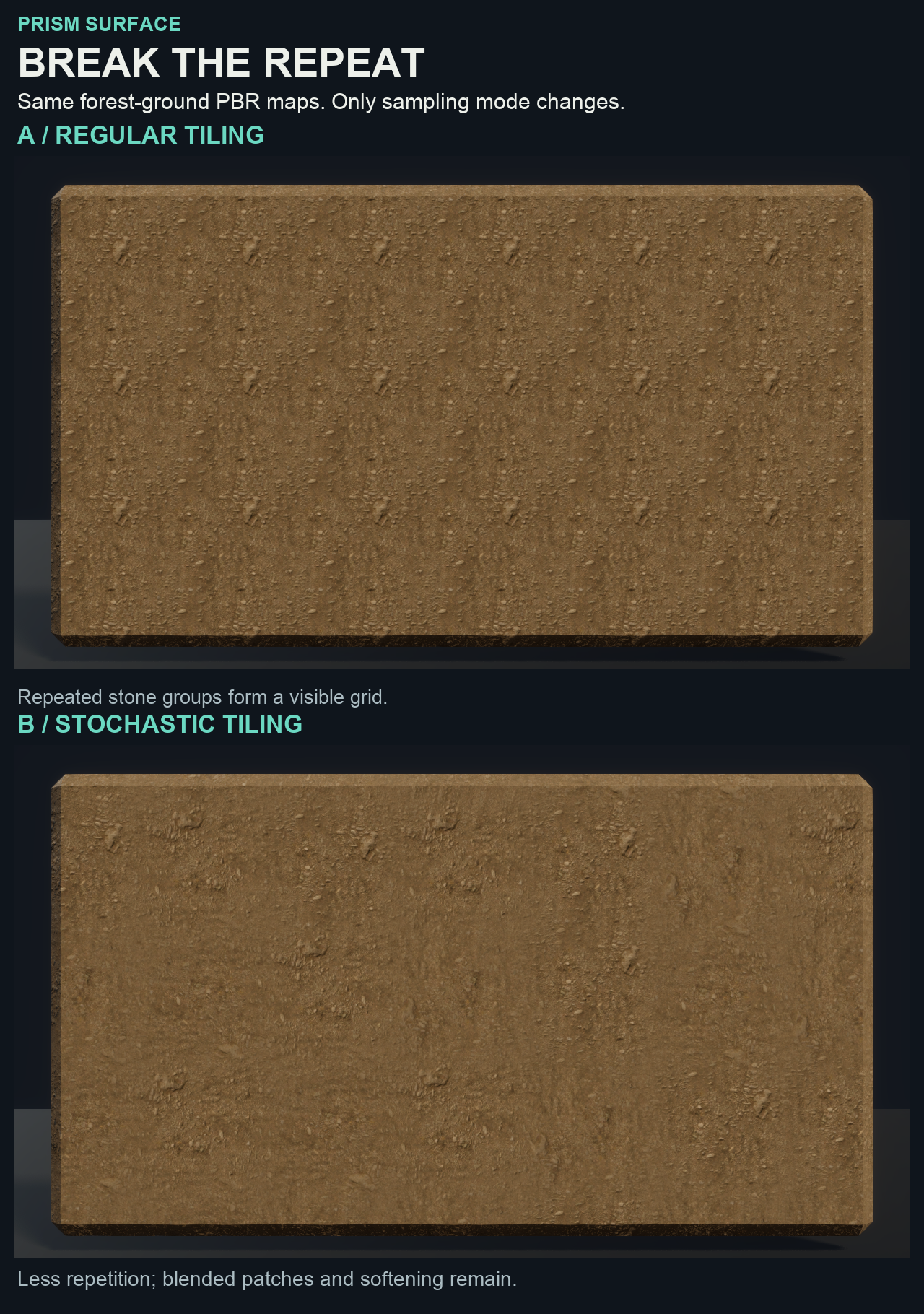
Why repetition survives a seamless texture
Matching the edges of a tile removes a border discontinuity. It does not remove the features inside it. Every repeated dark stone, bright patch, or directional streak still appears at predictable intervals.
Projection and repetition are separate concerns. Triplanar mapping projects a texture along three axes and blends the projections according to the surface normal. This can cover differently oriented surfaces without relying on their UV unwrap. Repeating the same projected texture still repeats its internal landmarks. Unity’s Triplanar Node reference describes that projection model.
Alternative techniques and where they help
Start by deciding which visual problem needs attention. These techniques can complement one another; none guarantees a convincing result for every texture.
- Change the source or its scale. A less distinctive tile can hide the grid. A larger projected texture makes each repeat farther apart, but changes the apparent size of its features.
- Rotate or mirror tiles. Varying orientation makes identical landmarks less predictable. Source edges and directional artwork still need inspection. PRISM’s UV Variation offers Random Cells and the more constrained Matched Edges mode.
- Add broad color variation or local detail. Macro variation can interrupt uniform tone; decals and placed details can give specific areas context. The underlying repeated feature can still be visible.
- Use several texture samples. Pattern or stochastic sampling varies which parts of the source appear nearby, then blends the candidates. This adds texture-sampling work and can soften distinctive features.
- Use triplanar projection for surface coverage. This addresses how the material reaches upright, sloped, and curved geometry. Combine it with a variation technique when repetition is also visible.
These are artistic choices as much as technical ones. A rotation that works for gravel may be distracting on a texture with a clear downward flow.
How PRISM combines projection and sampling
PRISM Surface’s current surface-material stack uses fixed triplanar mapping, with World or Object mapping space. World Scale controls projected texture size. Triplanar Blend Sharpness controls the weighting of the projection axes. Base Color, Mask, Normal, Detail, and Emission use coordinated sampling so the material layers follow the same variation.
Its Anti-Tile Mode exposes three choices:
- None: the baseline when the repeated pattern is acceptable.
- Pattern Variation: a multi-sample path with Fast (4), Quality (9), and Extreme (16) presets.
- Stochastic Tiling: four deterministic neighboring candidates per projection, with procedural per-cell orientation and jitter. This mode does not require a Blue Noise texture assignment.
Stochastic candidates crossfade rather than cutting abruptly between unrelated samples. That transition reduces the obvious grid, but can also create ghosting and soft patches. The Detail Map in this implementation modifies albedo; it does not add independent detail normals or roughness.
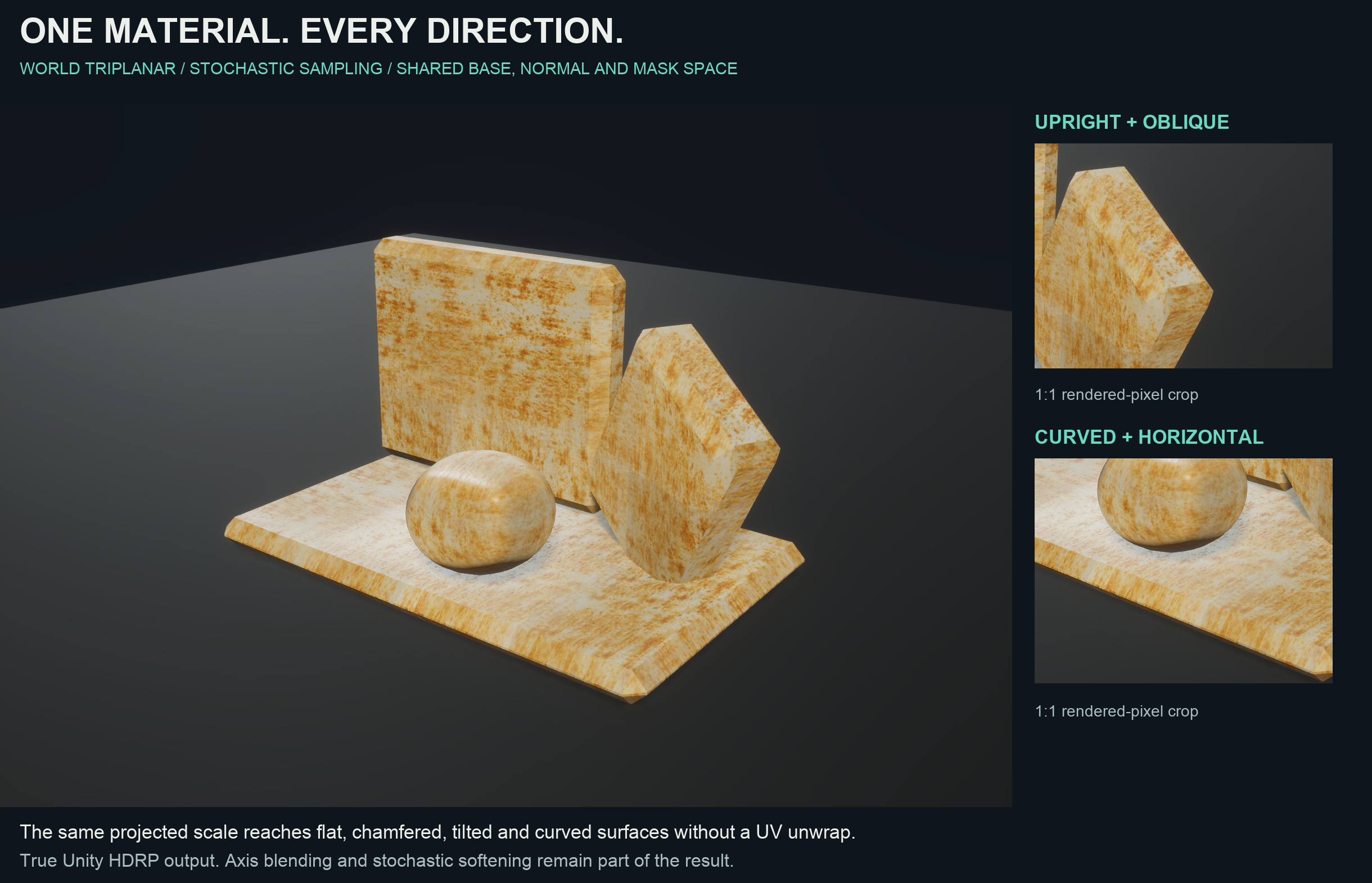
For the supported controls and workflow, see PRISM Surface Materials. The projection image uses a different texture from the controlled forest-ground pair; its appearance should not be treated as another step in that A/B comparison.
A controlled example and its settings
The forest-ground capture was recorded in Unity 6000.3.10f1, HDRP 17.3.0, on Metal. Both materials use the same 2K diffuse, OpenGL normal, and packed mask inputs from Poly Haven’s Forest Ground 04. Changing only Anti-Tile Mode isolates the sampling mode’s effect, including the softening caused by its blending.
Reproduce this comparison
The saved Ground A and Ground B materials use the same shader, texture references, scalar values, and colors, except for Anti-Tile Mode. Their serialized settings agree with the capture report. Shared values are listed once below.
| Control | Shared value |
|---|---|
| Mapping Space / World Scale | World / 0.8 |
| Triplanar Blend Sharpness | 4 |
| UV Variation / seed | Off / 0 (seed inactive in both) |
| Color Variation | Off |
| Detail Strength / Tiling | 0 / 6 (detail contributes zero in both) |
| Normal Scale | 0.85 |
| Base tint / Emission | White / Off |
| Animated micro variation | Off |
These anti-tile values are also saved identically in both materials. All four are inactive in A (None) and active in B (Stochastic Tiling). Switching the mode makes them take effect; their values do not change.
| Control | Shared saved value |
|---|---|
| Anti-Tile Scale | 1 |
| Cell Blend Width | 0.7 |
| Stochastic Jitter Strength | 0.12 |
| Stochastic Blend Sharpness | 1.2 |
The mask packs R = 0, G = ambient occlusion, B = 1, and A = 1 − roughness. Metallic, AO, and smoothness remaps remain 0–1. Source textures use Repeat wrap, Trilinear filtering, and mipmaps; diffuse is sRGB, the normal uses Unity’s Normal Map import type without a green-channel flip, and the mask is linear.
The panel measures 8 × 4.5 × 0.25 metres. The camera is at (0, 2.4, −10.8), looking at (0, 2.4, 0), with a 36° field of view. Both native frames are 1600 × 1000, with fixed EV100 10.8, ACES tonemapping, and SMAA. The key light is 17,000 lux at rotation (40, −35, 0); fill is 9,000 lux at (35, 130, 0). The original scene’s sky and ambient occlusion are shared.
The promotional layout uses the same crop, from (180, 140) to (1420, 850), in both frames. The source handoff records unretouched render crops, a fresh saved-scene reload, and a shader-error check. These are recorded results on that baseline, rather than a new cross-platform validation performed for this article.
To compare your own material, save two copies and keep geometry, camera, maps, scale, exposure, and lighting fixed. Begin with UV Variation and other extra variation disabled. Change only Anti-Tile Mode, then inspect at close range and at the intended gameplay distance. Treat the values above as a recorded example, not universal defaults.
Trade-offs to inspect before choosing a mode
Blending changes the appearance. The forest-ground image retains irregular blend cells, softened or ghosted stones, and repeated local motifs. Strong streaks and high-contrast artwork can make these transitions more noticeable. Reducing repetition does not guarantee seamlessness or preserve every source feature.
Projection needs review too. Inspect corners, changing normals, and the intended mapping space. The triplanar image shows the demonstrated surfaces; it does not establish that every asset needs no UV work.
More candidates mean more sampling. Stochastic Tiling uses four candidates per projection for each active texture layer, approximately four times the texture-sampling work of None per layer. This is not a measured fourfold change in frame time: profile the complete scene on target hardware. No FPS, performance improvement, or Windows DXR visual-parity result is established by these captures.
Tune Anti-Tile Scale first, then Cell Blend Width, Jitter Strength, and Stochastic Blend Sharpness. Increasing variation can make source landmarks less repetitive while making blends more conspicuous. Choose the smallest change that improves the material at the distances that matter.
Further reading and image credits
- PRISM Surface Materials — current mapping, variation, anti-tile controls, and cost guidance.
- PRISM performance and troubleshooting — practical inspection and profiling guidance.
- Unity Shader Graph: Triplanar Node — the general projection model.
- Heitz and Neyret: High-Performance By-Example Noise using a Histogram-Preserving Blending Operator — further research on stochastic texture blending. This paper describes a different algorithm; PRISM’s four-candidate implementation is not a claim of implementing that histogram-preserving method.
The images are authentic PRISM Surface Unity HDRP captures from Quantum Rift Interactive’s shader showcase. Website-sized versions are resized WebP copies; the linked original PNGs preserve the supplied promotional layouts.
Forest-ground textures: Forest Ground 04, photography and processing by Rob Tuytel, minor adjustment by Rico Cilliers. Projection demonstration: Rusty Metal 02 by Rob Tuytel. The source texture assets are available under Poly Haven’s CC0 asset license.
Explore the PRISM Surface product page for the connected material and surface-detail workflows.